
We have recently launched an English language version of our website, which is in Beta. It's in Beta because there are a few aspects that are not yet available in English, including borrower descriptions, Frequently Asked Questions and Terms & Conditions.
You can contact us directly on [email protected], or 0034 936 240 428, if you have any questions regarding these or any other aspects of our website and services.
If you’d like to access our English language website now then click here and select the language option in the top right had corner.

This blog post is intended to give an introduction to our English language users on how to participate in auctions.
How do I make a bid?
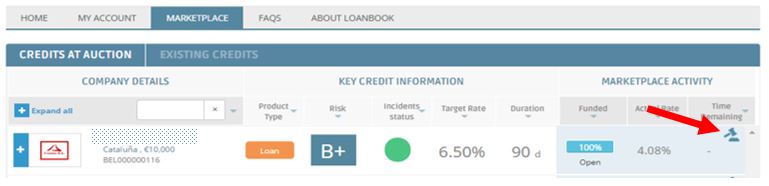
You can make a bid either directly through on the Marketplace page, by clicking on the bid icon, or through the credit profile page. Once you’ve made a bid you can monitor their progress either in My Account by clicking on Pending Activity, or in the bottom half of the Auction Summary on the credit profile page. You are only able to cancel or edit bids through My Account.
Marketplace:
Credit profile:
.jpg)
How are bids accepted and rejected?
Once the auction comes to an end, bids with lower interest rates will be accepted in preference to those with higher rates.
Auctions have a pre-determined duration and will remain open to new bids for the entire duration, regardless of whether bids reach 100% of the credit amount before the final day. This is to allow bids to become competitive, with bids at higher rates being superseded by those made at lower rates.
How do I know if my bid is competitive or not?
Bids are marked with flags to indicate their status. You can see these flags in the Status column under the Pending Activity tab in My Account, as well as in the bid table on the Auction Summary section of the credit profile.
The flags indicate:
 The bid is currently competitive and would be accepted if the auction were to close given other bids in the auction.
 The bid is not currently competitive and will be rejected if the auction were to close given other bids in the auction.
.jpg) The bid is partially competitive, meaning that if the auction were to close a proportion of the bid would be rejected given other bids in the auction.
The bid is partially competitive, meaning that if the auction were to close a proportion of the bid would be rejected given other bids in the auction.
If an auction becomes competitive due to an over-subscription of bids, and your bid is superseded by another bid at a more competitive rate, then you will be notified by email.
How does the Floor Rate help ensure my bid remains competitive?
You can optionally introduce a Floor Rate when making a bid. This enables the rate of your bid to be automatically lowered to ensure it remains competitive in the event of an over-subscribed auction. Your bid will never be lowered below the Floor Rate you set.
What’s the purpose of the Target, Average and Maximum AER’s?
The Auction Summary contains three bits of information intended to help guide the rate of bids.
Target AER
The target AER is normally expressed as a range, and indicates interest rate range that we consider to be most appropriate for this credit, given its risk rating.
Average AER
This is the average rate of bids that are currently competitive in the auction.
Maximum AER
Once an auction becomes competitive, i.e. after it is 100% subscribed, the maximum AER indicates the rate below which a bid must be made for it to be competitive.
We hope that this information helps you get started and we look forward to hearing from you with any questions or feedback!
Kind regards,
Trinidad Pérez
Senior Operations Manager
Trinidad is responsible for daily operations at LoanBook. She has over 10 years’ experience in operations, a degree in Business Administration from the University of Barcelona, and a postgraduate degree in Finance and Operations, specialising in process and systems optimisation.
